


Find Shopify stores using specific apps
Find Shopify stores running a competitor's app or a complementary one, plus stores that installed it in the last 45 days or removed it in the last 90. Add category, country, catalog, advertising and contact filters to focus the list.
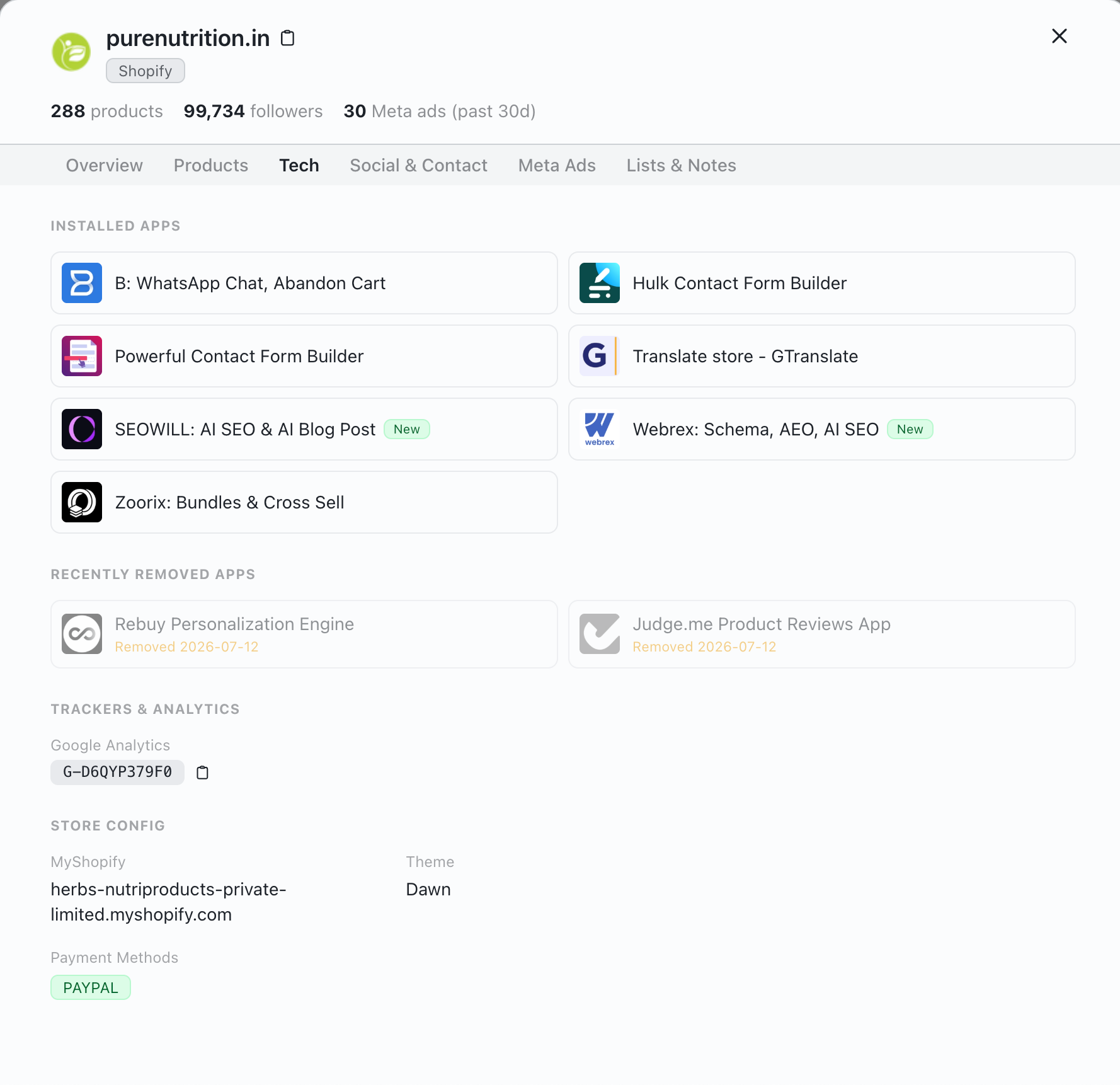
-
1
Installed apps
Every Shopify app we detect on the store. New marks an install from the last 45 days.
-
2
Recently removed apps
Apps the store dropped in the last 90 days, with the date we noticed.
-
3
Theme and payments
The theme and payment methods, for apps that depend on them.
Example: prospects for a reviews app
Stores running a competing reviews app that also fit your offer, with today's real counts. Click a filter name to see what it matches.
- All searchable stores 7,188,224
- Platform: Shopify 3,108,594
- Shopify Apps: Loox 79,212
- Category: Apparel & Accessories 16,371
- Product Count: 100+ 7,846
- Contact Info: Has Email 3,930
- A short list to review and export Run a search like this for free 3,930 stores
Turn app data into a prospect list
A current install shows a store already works the way your app expects. A new install or a removal adds timing. Pair either with store-fit filters so research starts from a short list.
-
1
Pick an app signal
Choose a competitor, partner or adjacent app, and whether you want current users, new installs or removals.
-
2
Add store fit
Narrow by category, country, product count, price, Meta ads, social presence and contact details.
-
3
Check the store
Open each promising store, confirm the app and the use case still apply, then save or export the ones worth contacting.
Current users, new installs and removals
Use current installs for competitor and integration research, new installs to study adoption, and removals to look for switching stores, without assuming why they changed.
Current users
Stores where the app is detected today. Check whether your alternative or integration really fits.
New installs
Stores that added the app in the last 45 days, useful for adoption research and launch timing.
Removals
Stores that removed the app in the last 90 days. Treat it as a cue to research, not proof they want a replacement.
Complementary apps
An adjacent app shows stores already investing in the workflow your integration supports.
What app data can tell you
Can BootLeads find every store using a Shopify app?
No. Apps are detected from what each public storefront shows, so apps that leave no trace there can be missed. Check important stores before acting on the data.
What counts as a new install or a removal?
New Shopify Apps covers installs in the last 45 days, and Removed Shopify Apps covers removals in the last 90 days. A change shows up once we check the store again.
Can I combine an app with other store filters?
Yes. Combine an app filter with category, country, catalog, price, advertising, social and contact filters to narrow the result.
Which apps can I search for?
Every app we detect on enough stores, with its App Store category and recent installs. See every Shopify app we track.
Keep exploring
Store reports
About the data
Build an app-based Shopify prospect list
Pick a current, new or removed app, add store-fit filters and check each store before outreach.